
Gopuff Driver
GopuffBusiness
4.11.73K Reviews
- Version
- 2.239.3
- Installs
- 500.00K
- Age Rating
- Everyone
Screenshots

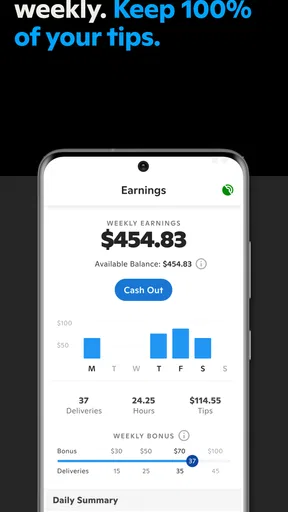
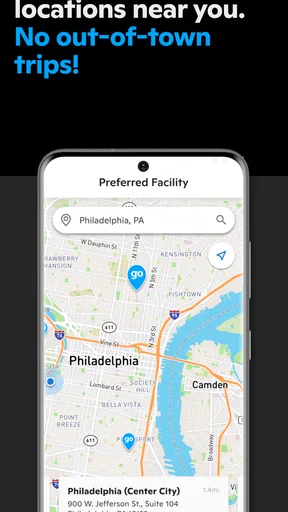

Our Review of Gopuff Driver
 Analysis by Appyee
Gopuff Driver is a business app for people who want to make deliveries through Gopuff, the delivery company developed by Gopuff. I spent time looking at it from the point of view of someone who would use a phone while moving between pickup points and customers, rather than treating it like a normal shopping app. That distinction matters: the useful part is not browsing products, but keeping delivery work organized while your attention is divided between the road, a collection point, and the next address.
The app is free to install and carries an Everyone age rating, which makes it approachable from a store perspective. Its average rating is 4.1 from around 4.8 thousand ratings, with roughly 1.7 thousand written reviews, and it has passed 500 thousand installs. Those figures suggest a reasonably established driver audience, although they should not be mistaken for a promise that the experience will be equally smooth in every city or on every phone.
What using Gopuff Driver feels like on the move
The first thing I noticed about a delivery-driver app is how much its quality depends on timing. When I am sitting at home with a strong connection, almost any work app can look tidy. The real test begins when I am outside, switching between a vehicle, a building entrance, a pickup location, and a customer handoff. Gopuff Driver belongs to that second kind of app. Its usefulness is tied to receiving current delivery information and moving through the required steps at the right moment.
A weak or changing connection can turn a simple action into an uncertain one. If a screen takes longer to update, I may not know whether the previous action was accepted, whether I should wait, or whether trying again might create confusion. That is not a cosmetic inconvenience when I am parked somewhere briefly or standing outside a customer’s building. My practical advice is to treat the app as a live work tool: check that the latest screen has loaded before setting off, and avoid making important changes while the phone is struggling to reconnect.
This network dependence also changes how I plan a shift. I would not rely on a delivery app alone for every piece of information I might need. A charged phone, a visible route plan, and a habit of checking the next task before driving are more valuable than trying to solve everything after the connection becomes unreliable. The best experience comes from preparing before the next handoff, not from fighting the app while already under time pressure.
Why the driver workflow is different from ordinary delivery apps
Many people compare Gopuff Driver with courier tools that mainly pass individual orders from a restaurant or shop to a driver. That comparison is useful, but incomplete. Gopuff’s model centers on deliveries from its own service, so the driver is working within a more defined delivery operation rather than simply accepting a parcel from any independent merchant. In everyday use, that can make the process feel more structured, but it also means the app is most relevant to people who are already interested in driving for Gopuff.
It is not a general-purpose navigation replacement, a customer shopping app, or a way to compare every local courier opportunity in one place. Someone looking for flexible work across several delivery platforms may prefer a setup that keeps multiple services visible at once. Someone who wants a focused Gopuff delivery workflow may appreciate having a dedicated app instead of trying to manage driver tasks through a customer-facing product.
The distinction is important for expectations. Installing it does not automatically make it a complete income-planning system. I would use it to support the delivery work itself, while keeping separate habits for fuel planning, phone charging, route awareness, and tracking the time spent working. That separation prevents the app from carrying responsibilities it was not designed to handle.
Mobile situations where it works best
Gopuff Driver makes the most sense on a phone that is easy to check quickly. In a car, the useful interaction is likely to happen in short pauses: before leaving a pickup area, after parking, or once a customer handoff is complete. I would avoid trying to read detailed information while driving. The app may be central to the work, but safe driving still requires the road and surroundings to take priority.
Walking deliveries create a different rhythm. A driver may move through apartment entrances, offices, lobbies, or unfamiliar residential areas, where holding a phone and carrying an order compete for attention. In that situation, I found the strongest workflow is to review the next instruction before leaving the vehicle, then use short checks rather than constantly staring at the screen. This reduces the temptation to troubleshoot connectivity or navigation while crossing a street or handling a delivery.
The app can also be useful for people who prefer a dedicated work identity on their phone. Keeping driver activity separate from personal messaging and shopping reduces the chance of mixing up a customer task with an unrelated notification. That is a small operational improvement, but it matters during a busy period when several apps are competing for attention.
There is a trade-off for drivers who use older devices. The current version is 2.239.3 and the minimum operating system is Android 7.0, so the app is not restricted to only the newest Android phones. Still, compatibility is not the same as comfort. A phone may meet the operating-system requirement yet have a tired battery, limited storage, or slower performance when location, navigation, and communication are active together. I would judge the app on the whole phone setup, not only on whether installation is allowed.
A realistic delivery scenario
Imagine starting a shift with a full battery and reviewing the first task while parked. The app shows the work that needs attention, and I check the next destination before pulling away. At the pickup location, I use a brief pause to confirm that the current task is still visible. After collecting the order, I move to the customer’s address and wait until the vehicle is safely parked before checking the delivery details again.
Now imagine the connection becomes inconsistent near a large building. The map or task screen takes longer to respond, and I am not sure whether the last update went through. My response would be to stop pressing buttons repeatedly, move to a safer and more open position if possible, and give the screen time to refresh. If the app recovers, I continue from the latest confirmed state rather than assuming every tap was accepted. If it remains unclear, I would use the available support or work process rather than improvising a delivery status.
That scenario shows why connectivity is not a technical footnote here. It affects confidence, pacing, and the amount of mental energy each delivery requires. A smooth connection makes the app fade into the background. An unstable one turns every transition into a question.
Handling weak signals and confusing moments
Failure recovery is where I would be most deliberate. When a driver app pauses, the instinct is to tap again, close it, reopen it, and repeat the same action. That can make it harder to tell what actually happened. My preferred routine is simpler: pause, check whether the phone has a connection, confirm the last clearly completed step, and only then continue. This is especially important after a handoff, because the work record may depend on the action being registered correctly.
I would also avoid restarting the phone or clearing app information in the middle of an active delivery unless there were no safer alternative. Those actions can remove context from the screen and create a new problem while the original one is still unresolved. A quick app restart may sometimes help, but it should be treated as a recovery step, not as the first response to every delay.
Another useful habit is to distinguish an app problem from a location problem. A building with poor reception, a crowded urban area, or a basement pickup point can make the same app appear unreliable even when the software is functioning normally. If the screen updates after moving a short distance into a clearer area, the lesson is about the environment. If other phone services work while the driver app remains stuck, the issue may be more specific to the app or its current session.
Drivers should also protect themselves from rushed decisions. If an address or task detail is not readable, continuing simply to stay on schedule can lead to a wrong turn or an avoidable handoff mistake. I would rather take a safe pause and re-establish a clear screen than turn a temporary loading issue into a longer delivery problem.
Using mobile data without wasting it
A driver can spend many hours with the phone active, so data-conscious habits are worthwhile even when the app itself is not unusually demanding. I would keep unnecessary background apps from refreshing constantly, avoid streaming media during busy delivery periods, and make sure navigation is not duplicating work across several services. The goal is not to disable useful connectivity, but to reserve the phone’s attention and data for the tasks that support the delivery.
Screen brightness is another practical balance. A very dim display is difficult to read outdoors, while maximum brightness can drain the battery quickly. I would use a level that remains visible in the current light and carry a reliable charging option for longer periods. A driver app is only useful if the phone remains available when the next task arrives.
It is also sensible to check the app before leaving a strong Wi-Fi connection, especially when preparing for a shift. That gives me a chance to sign in, inspect the current screen, and identify any update or loading issue before I am already working. I would not interpret that preparation as proof that the app can operate without a network; it is simply a way to reduce avoidable surprises once mobile data becomes the main connection.
Privacy deserves a practical mention too. A phone used for delivery work may contain personal messages, photos, and accounts alongside work information. I would use a screen lock, avoid leaving the device visible in the vehicle, and be careful when showing a screen around customers. Those habits are not special features of Gopuff Driver, but they are part of using any delivery tool responsibly.
Who should choose it, and who should look elsewhere
I would recommend Gopuff Driver to someone who specifically wants to explore delivery work with Gopuff and is comfortable managing a phone during frequent short stops. It is a sensible fit for a driver who values a dedicated work app and understands that a reliable connection, a usable phone, and good personal organization all contribute to the experience.
I would be more cautious recommending it to someone who expects the app itself to answer every employment, earnings, navigation, or vehicle-cost question. It is also not the right first choice for a person who wants one dashboard for many unrelated courier services. In that case, a multi-platform driver tool or the official apps for several delivery companies may offer a broader view, even if that arrangement brings its own complexity.
Drivers who regularly work in places with poor reception should think carefully before depending on it as their only work aid. The central issue is not whether the app can be installed, but whether the phone can maintain the connection needed during the moments when tasks change or actions need confirmation. If connectivity is a constant problem in the areas where you work, the practical advantage of a dedicated driver workflow may be outweighed by interruptions.
The app is free, which removes an obvious barrier to trying it. I would still treat free installation as the beginning of an evaluation, not a guarantee that the work will suit me. The real costs may come from time, fuel, battery use, mobile data, and the effort of dealing with busy periods or difficult locations. Those are personal trade-offs, so I would test the workflow during a realistic delivery period rather than deciding from the download screen alone.
My view after weighing the daily trade-offs
Gopuff Driver succeeds when it stays in the background and gives the driver a clear next step at the moment it is needed. Its strongest quality is its focus: it is built around making Gopuff deliveries rather than presenting itself as a broad marketplace or a generic business organizer. That focus can make the work feel more manageable for the right user.
Its main weakness is equally clear. Because the experience is tied to live mobile use, connection quality and phone readiness can shape the whole shift. A driver who ignores those factors may blame the app for problems caused by a weak signal, a low battery, or an overloaded device. A driver who plans around them will have a fairer chance to see what the app actually offers.
Gopuff has kept the product active, with a release date of March 24, 2022, and the current version listed as 2.239.3. I see that as useful context for someone deciding whether the app is an established tool rather than an untested experiment, while still remembering that an update number alone does not describe how well it will behave in a particular delivery area.
My final recommendation is conditional but positive: try it if Gopuff delivery work is the opportunity you are considering, your Android phone meets the requirement, and you are prepared for a connection-dependent routine. Before relying on it for a full day, test the sign-in and task flow, check how quickly your phone responds in the places you expect to work, and build a simple recovery habit for moments when the screen stops updating. For the right driver, Gopuff Driver is a practical work companion; for someone seeking an all-in-one courier career platform, it is too narrow.
Verdict
Strengths of Gopuff Driver
- Flexible scheduling lets drivers choose when they want to work.
- In-app navigation helps manage deliveries and find customer addresses.
- Delivery details and earnings are shown within one central app.
- Drivers can often work locally without long-distance trips.
- Useful for earning extra income around another job or schedule.
Limitations of Gopuff Driver
- Earnings can vary significantly with demand, tips, and available orders.
- Vehicle costs, fuel, insurance, and maintenance reduce take-home pay.
- Busy periods may involve waiting at pickup locations.
- Customer addresses and delivery instructions are not always accurate.
- Availability and requirements can differ by city or service area.
Other Releases by Gopuff
View All
Gopuff - Grocery Delivery
Food & Drink4.6
Similar Picks in This Category
View All
LinkedIn: Community & Network
LinkedIn3.8

Zoom Workplace
zoom.com4.1

Microsoft Teams
Microsoft Corporation4.6

Meta Business Suite
Meta Platforms, Inc.4.6

Webex Meetings
Cisco Systems, Inc.4.5

TeamViewer Remote Control
TeamViewer4.4
Frequently Asked Questions
What is Gopuff Driver, and how does the app work?
Gopuff Driver is the delivery-partner app used by drivers who deliver orders from Gopuff facilities to customers. After signing in, drivers can typically view available delivery opportunities, navigate to the pickup location, confirm orders, and complete drop-offs using in-app instructions. The exact workflow, delivery zones, and available features may differ depending on the driver’s city and current Gopuff policies.
What are the requirements to become a Gopuff Driver?
Applicants generally need to meet local age and eligibility requirements, have a valid driver’s license, access to a reliable vehicle, and carry any legally required insurance. Gopuff may also request identity verification, background screening, and vehicle documentation before approval. Requirements can vary by location and may change, so applicants should review the current criteria shown during registration before downloading or applying.
How much can drivers earn with Gopuff Driver?
Earnings can depend on the city, delivery distance, number of orders, demand, tips, incentives, and the time spent online. The app may display delivery-related payment information, but income is not guaranteed and can fluctuate considerably from one shift to another. Drivers should also account for fuel, maintenance, insurance, taxes, and vehicle depreciation when estimating their actual take-home earnings.
Does Gopuff Driver require drivers to work scheduled shifts?
Gopuff’s scheduling and availability system may differ according to market and operational needs. In some areas, drivers may select or reserve delivery blocks, while other locations may offer different ways to become available for orders. Before relying on the app for flexible work, check the current local rules, how cancellations are handled, and whether failing to attend a scheduled period can affect account standing.
What should I know about privacy, permissions, and app reliability?
Gopuff Driver may request location access, notifications, camera access, and other permissions needed for navigation, delivery verification, communication, and account management. Location services can affect battery and mobile-data usage, particularly during long delivery periods. Drivers should install the app from an official store, keep it updated, and understand that connectivity, GPS accuracy, or temporary technical issues may occasionally affect order handling.
